Your store, not a stock scene
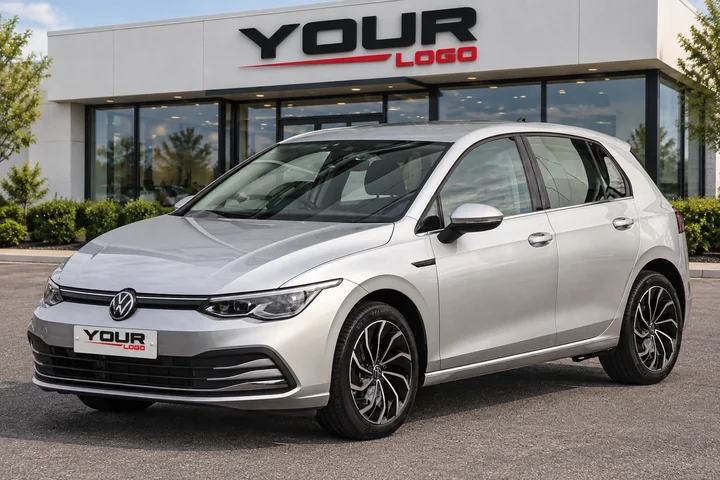
Shoppers see your building and sign behind the car, the same as if they drove by the lot.
Your dealership background
Upload one photo of your storefront and CarPixAI places each car in front of it, with your sign and building kept as photographed. Shoppers see your store behind every listing, and the background is the same from car to car.
No credit card required. Review every result before publishing.
Quick answer
Yes. In CarPixAI you add a photo of your storefront, lot or showroom under My scenes, approve it, and pick it like any built-in background. Each car you process is placed in front of that same building at its own camera angle. Your permanent sign stays as photographed, and the car itself is not changed.
A generic studio looks clean, but it looks the same as everyone else's. Your own building tells shoppers who is selling the car and where to find it.
Shoppers see your building and sign behind the car, the same as if they drove by the lot.
Shoot cars wherever they are parked. The storefront is added afterwards, so nobody has to move cars to the front of the building.
Pick your storefront once and save it as a studio. Every car in the batch gets the same building, logo and plate settings.
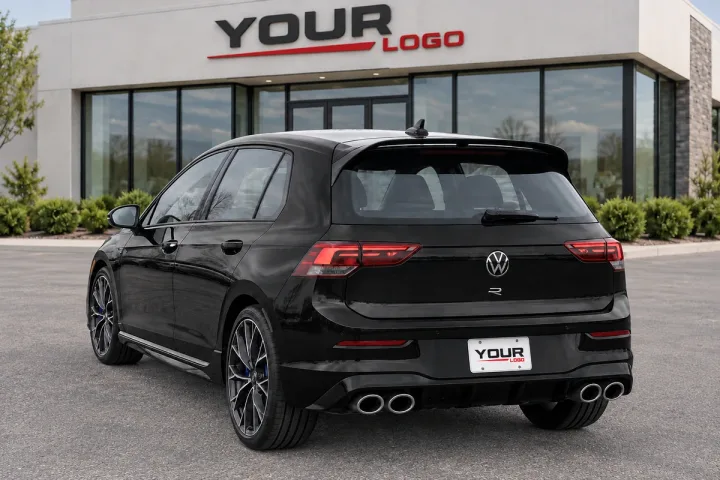
Two different cars, photographed at different angles, both placed in front of the same building. Illustrative examples; YOUR LOGO marks where your own sign appears.
How it works
Stand where you would park a car for photos and shoot the building straight on, with open space in the middle for the car. A phone photo is fine.
Open the scene picker, choose Add your dealership photo, give it a name and pick exterior frontage or indoor studio. JPG, PNG or WebP up to 12 MB.
Check the photo once and approve it. Cars, people and clutter in your photo are ignored, so they never end up in a listing.
Pick your storefront like any other scene and save it with your logo, plate and framing settings, so the whole team uses the same look.
Upload inventory photos as usual. Each car is placed in front of your dealership at its own camera angle. Compare it with the original before you publish.
Photo tips
You only take this photo once, so a few minutes here pays off on every listing.
Stand where a car would sit for photos and keep the phone level. Heavy angles are harder to match to every car.
An empty stretch of forecourt in front of the building is where the car goes.
Shoot in even daylight with the whole sign visible, not cut off at the top.
Upload a place your dealership has the right to show. Parked cars and people in the photo are left out.
Both are in the same scene picker, so you can switch per batch.
What shoppers see
Your dealership: Your own building and sign
Built-in: A clean studio, showroom or dealership scene
Setup
Your dealership: One photo of your store, approved once
Built-in: None, pick and go
Best for
Your dealership: Stores with a recognizable front or showroom
Built-in: A neutral look, or when the storefront is not photo-ready
Logo and plates
Your dealership: Save with your logo and plate settings
Built-in: Same settings available
Prefer a ready-made scene? Browse the background library or add your logo to the plates.
Frequently asked questions
It is the scene behind the car in a listing photo. With CarPixAI you can use a photo of your own dealership as that scene, so every car looks like it was photographed in front of your store instead of on a random lot or in a generic studio.
Yes. Upload a photo of your storefront, lot or indoor showroom under My scenes, approve it, and select it when you process photos. You can save up to 50 of your own scenes per account.
Your permanent building sign, lettering and wall logos are kept as photographed. The car can cover part of the building, the same way it would in a real photo, and every result should be checked before you publish it.
No. A clear phone photo taken straight on, in daylight, with open space in the middle works. Avoid heavy angles, people in front of the entrance and photos where the sign is cut off.
They are left out. CarPixAI uses your photo for the building, materials and layout only, and removes parked cars and temporary clutter from the scene.
Every car is placed in front of the same storefront, matched to that photo's camera angle. Parts of the building hidden in your photo may be filled in, so it is consistent but not a 3D model of your site from every angle.
No. Paint, wheels, trim, badges and any visible damage should stay as photographed. Only the scene behind the car changes.
Yes. Save your storefront as a studio together with your dealer logo, license plate treatment and framing, then reuse that studio for every batch.
Start with your free photos, add one photo of your dealership, and check the results before you change anything else.
Try 10 photos free